Hilya: A Modern Script Font for Web Design
I was stuck on the hero section of a boutique coaching website. The client wanted something that felt approachable and warm, yet professional enough to build immediate trust. I had cycled through three different sans serif font options for the headline, but they all felt too corporate, too stiff. Then I pulled up Hilya. Within seconds, the mood of the entire landing page shifted. It wasn't just another decorative script; it had a modern rhythm that breathed life into the digital canvas. As a web designer who lives in the details of UI and UX, finding a typeface that balances charm with clarity is rare. Hilya has quickly become my go-to for adding personality to brand identities without sacrificing readability.
The Digital Personality of Hilya
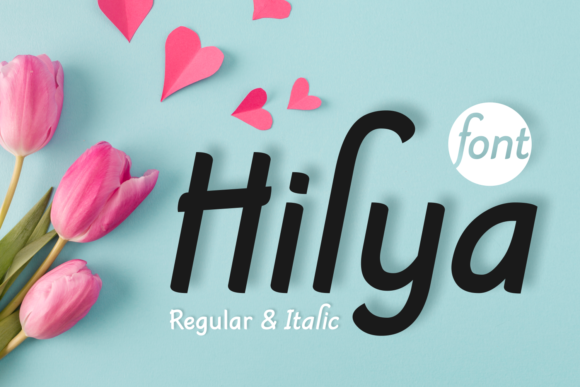
At first glance, Hilya presents itself as an elegant and modern script font with a charming style. But when you load it into a browser and start testing it against different backgrounds, its true character emerges. Unlike many traditional calligraphy fonts that can feel dated or overly ornate, Hilya feels contemporary. Its strokes are fluid, mimicking a confident handwritten font, but the spacing and kerning are engineered for the screen. This makes it an excellent choice for modern typography in web design.
When I tested Hilya over a high-resolution image banner for a wedding planning portfolio, the contrast was perfect. The playful appearance of the letters didn't get lost in the background noise. Instead, they popped with a sense of joy and creativity. For designers looking to inject emotion into a site, this font acts as a powerful visual hook. It tells the visitor immediately that this brand is human, creative, and accessible. In the world of web design, where attention spans are short, that initial emotional connection is everything.
Performance in Hero Sections and Headlines
The real test for any display font is how it performs in high-impact areas like hero sections and main headlines. I placed Hilya as the primary title on a product landing page for a handmade candle shop. The text read "Handcrafted with Love," and the result was stunning. The curves of the 'H' and the 'L' drew the eye naturally across the screen, guiding the user's scanning behavior toward the call-to-action button below.
However, it is crucial to understand where Hilya shines and where it should be restrained. This is definitely a display font. It excels at grabbing attention in large sizes. Whether it is a bold statement on a coaching website homepage or a welcoming header on a blog redesign, Hilya commands space beautifully. It works exceptionally well for short phrases, names, titles, and decorative wording. If you are designing a logo for a small business or creating a unique header for a course sales page, this typeface adds a premium feel that generic system fonts simply cannot match.
One specific use case I loved was using Hilya for social media graphics that mirrored the website's branding. Consistency is key for brand identity, and having a font that translates seamlessly from a desktop hero section to an Instagram story cover is a massive advantage. The playful nature of the font ensures that your digital assets feel cohesive and intentional.
Readability and Responsive Layouts
As we move from desktop to mobile, readability becomes the most critical factor. I spent time previewing Hilya on various device sizes, from large monitors to compact smartphones. On larger screens, the intricate details of the script are visible and delightful. On mobile devices, the font remains legible as long as you maintain sufficient size and line height.
For responsive layouts, I recommend using Hilya strictly for headings and subheadings. Do not attempt to use it for body copy. While the font is clean, the inherent nature of a script style means that reading long paragraphs of text will cause eye strain for users. Instead, pair Hilya with a neutral, highly readable sans serif font for your body text. This combination creates a strong visual hierarchy. The Hilya headers act as signposts, inviting the user to read, while the sans serif body text delivers the information efficiently.
When testing on dark mode themes, Hilya held up remarkably well. The stroke weight is consistent enough that it doesn't disappear against dark backgrounds, provided you use a light color variant. However, avoid placing it over busy, high-contrast images without a subtle overlay or shadow, as the thin terminals of the script might compete with complex background patterns. In my experience, a simple drop shadow or a slight letter-spacing adjustment often solves these visibility issues instantly.
Strategic Font Pairing for Web Projects
The magic of Hilya truly unlocks when you consider font pairing. Because it is a script font with a lot of personality, it needs a partner that steps back and lets it shine. My preferred pairing strategy involves combining Hilya with a geometric or grotesque sans serif font. The clean lines of a modern sans serif provide a structural foundation that grounds the whimsy of the script.
For example, on a recent project for a lifestyle blogger, I paired Hilya headers with a clean, minimalist sans serif for navigation and article text. The result was an editorial design feel that looked expensive and curated. If you want a slightly more classic look, a simple serif font can also work, though the contrast is less dramatic than with a sans serif. The goal is always balance. You want the Hilya to feel like the star of the show, not part of a chaotic ensemble.
This pairing strategy is vital for maintaining professionalism. A common mistake in creative font usage is letting the decorative element overwhelm the content. By anchoring Hilya with a sturdy, utilitarian typeface, you ensure that the site remains functional and user-friendly while still retaining that unique, charming aesthetic.
Licensing and Technical Considerations
Before integrating Hilya into a client project or your own online store, there are practical technical details to verify. Always check the included file formats. For web implementation, you need access to WOFF and WOFF2 files to ensure fast loading times and broad browser compatibility. Slow-loading fonts can hurt your Core Web Vitals scores, which impacts SEO.
Additionally, review the commercial font licensing carefully. If you are building a website for a client, a SaaS platform, or an e-commerce store, you must ensure the license covers web usage and the number of visitors you expect. Some licenses restrict usage based on monthly page views, so reading the fine print is essential to avoid legal headaches down the road. Also, check for multilingual support if your audience is global. While Hilya looks fantastic for English-based designs, ensuring it supports the characters needed for your specific market is a smart step in the design process.
Final Thoughts on Hilya for Digital Brands
In conclusion, Hilya is a standout addition to any designer's toolkit. It bridges the gap between handcrafted warmth and digital precision. Whether you are launching a new portfolio, redesigning a landing page, or refreshing your social media graphics, this font offers a level of elegance and playfulness that is hard to find elsewhere. Just remember to respect its role as a display typeface, pair it wisely, and keep the user experience at the forefront of your decisions. When used correctly, Hilya doesn't just add text to a page; it adds soul.